Here's how to create and use a Google Form so students can easily collect and organize research.
I used this with 5th grade students on the second day of logging into a Google Apps account. The students were already comfortable researching in our Edmodo library and using multiple tabs in a browser. They logged into their own Google Apps account, I lead them through the process of creating from a template, renaming it, opening the live form, and then set them free to collect facts.
Showing posts with label Edmodo. Show all posts
Showing posts with label Edmodo. Show all posts
Sunday, April 1, 2012

Friday, March 30, 2012
Cultivating Student Researchers using Google Apps for Education
This is the 7th part of a series in which 5th grade musicians are using Edmodo and Google Apps for Education to research composers and create websites based on that research.
How do we teach students how to find the best car when they are older?
How do we teach students to select the best financial investments someday?
It all starts with research. The ability to research is one of the most important tools we equip our students with for their future. Teaching students to research means teaching them how to grow their own knowledge base. It means teaching them how to select, compare, analyze, synthesize, evaluate, question, and all those other though processes that we look for in teaching. Researchers are lifelong learners and contributors.
Teaching beginning researchers is always a fun challenge. Think about the skills needed to research:
• Locating information
• Reading for information (this is the most important skill - it is also the most difficult skill because students must slow down)
• Putting the information into your own words
• Citing sources
• Managing the research that you collect (index cards, notetaking app, etc.)
• Organization of information (the second biggest skill - assembling collected facts into a logical order to create a new product)

I added another challenge to this list this year - how do we do paperless research? In past posts, I talked about our Edmodo library for biographies, timelines, and videos. That takes care of locating the information. But what about collecting the information, citing sources, and organizing? Did I really want to have kids writing notes on paper while sitting at a computer? And how could I take advantage of Google Apps in this process?
My answer? I decided to use a Google Form. The form has just 3 questions, all required:
1. What kind of fact will this be? Students must choose the kind of fact from teacher-created categories.
2. Where did you find this fact? Students must cite their source.
3. What is the fact?

I saved the form as a template and had the kids use my template. I couldn't just share the form with them because then everyone's facts would end up on the same form - no good. Each student needed their own copy from a template. The students renamed it and opened the live form. A quick tutorial about the 3 questions, open the Edmodo library in another tab, and - VOILA - research! Each fact that the student enters into the form shows up on the associated spreadsheet. The kids had no idea how the mechanics of this works - they just need to experience it first. After a few minutes of submitting facts, I had the kids tab to their spreadsheet and they were amazed to see their list of facts growing!
The real bonus is yet to come - the Google form/spreadsheet will help the kids organize their research, too! The magic is in question #1 - "What kind of fact is this?" I numbered the choices and put them in a logical order from birth to death. When the students click on the spreadsheet column header, they will be able to sort their facts numerically (A-Z) and their notes will be roughly in the order that they should appear in their essay! Also, by putting URLs into the citation box (question #2), students can easily click to the source for their fact - very helpful when the teacher thinks a student may have an incorrect fact or when the student needs to be encouraged to dig deeper into a fact.


Are all these shortcuts cheating the students? No, for three reasons:
1. These are beginning researchers. Getting them excited about research and giving them the skills is more important than the mechanics at this point.
2. This is a music class where we only get 60 minutes per week. We need to leverage our time in the lab for maximum productivity.
3. Why shouldn't we harness the technology available to them now and in their future? Do we really believe any of these kids will be using index cards in the future to organize their research? Would you?
Research is inherently collaborative because you are using someone else's work. Research is inherently creative because the end result of research is always something new. Research teaches students to take action because research is always about choices. Collaboration, creativity, and action - what more can you ask for?
How do we teach students how to find the best car when they are older?
How do we teach students to select the best financial investments someday?
It all starts with research. The ability to research is one of the most important tools we equip our students with for their future. Teaching students to research means teaching them how to grow their own knowledge base. It means teaching them how to select, compare, analyze, synthesize, evaluate, question, and all those other though processes that we look for in teaching. Researchers are lifelong learners and contributors.
Teaching beginning researchers is always a fun challenge. Think about the skills needed to research:
• Locating information
• Reading for information (this is the most important skill - it is also the most difficult skill because students must slow down)
• Putting the information into your own words
• Citing sources
• Managing the research that you collect (index cards, notetaking app, etc.)
• Organization of information (the second biggest skill - assembling collected facts into a logical order to create a new product)

I added another challenge to this list this year - how do we do paperless research? In past posts, I talked about our Edmodo library for biographies, timelines, and videos. That takes care of locating the information. But what about collecting the information, citing sources, and organizing? Did I really want to have kids writing notes on paper while sitting at a computer? And how could I take advantage of Google Apps in this process?
My answer? I decided to use a Google Form. The form has just 3 questions, all required:
1. What kind of fact will this be? Students must choose the kind of fact from teacher-created categories.
2. Where did you find this fact? Students must cite their source.
3. What is the fact?
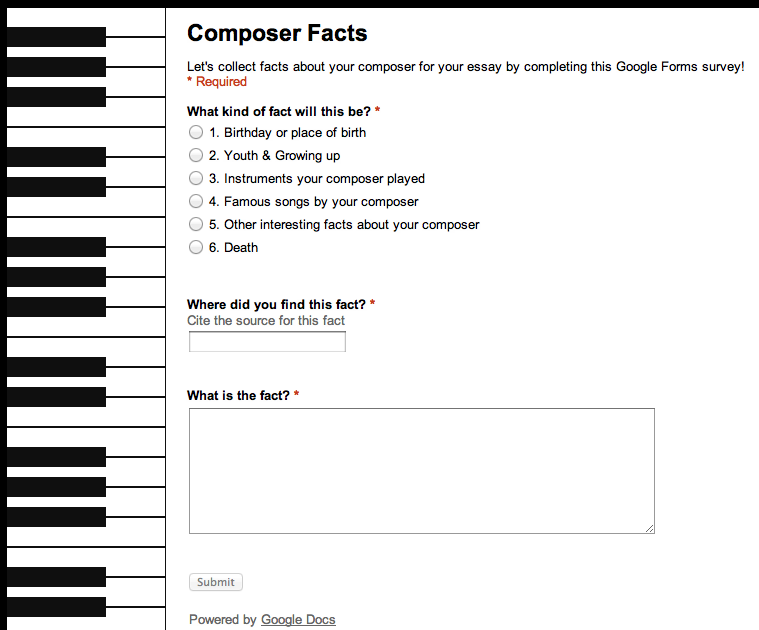
I saved the form as a template and had the kids use my template. I couldn't just share the form with them because then everyone's facts would end up on the same form - no good. Each student needed their own copy from a template. The students renamed it and opened the live form. A quick tutorial about the 3 questions, open the Edmodo library in another tab, and - VOILA - research! Each fact that the student enters into the form shows up on the associated spreadsheet. The kids had no idea how the mechanics of this works - they just need to experience it first. After a few minutes of submitting facts, I had the kids tab to their spreadsheet and they were amazed to see their list of facts growing!


Are all these shortcuts cheating the students? No, for three reasons:
1. These are beginning researchers. Getting them excited about research and giving them the skills is more important than the mechanics at this point.
2. This is a music class where we only get 60 minutes per week. We need to leverage our time in the lab for maximum productivity.
3. Why shouldn't we harness the technology available to them now and in their future? Do we really believe any of these kids will be using index cards in the future to organize their research? Would you?
Research is inherently collaborative because you are using someone else's work. Research is inherently creative because the end result of research is always something new. Research teaches students to take action because research is always about choices. Collaboration, creativity, and action - what more can you ask for?
Monday, March 26, 2012
Constructing Knowledge Through Online Conversations
This is part 5 in a series of an Edmodo/Google Apps for Education project in which 5th grade musicians research composers and create websites based on that research.
After two classes getting our feet wet using Edmodo, it was time to dive in. In the first two classes, I found the students were doing well at locating information in our Edmodo library, navigating between multiple tabs in a browser window, reading for information, putting information into their own words, and posting amazing facts to our Edmodo group. What the students could not do well was reply to posts in a way that creates a conversation.
This is an oft-lamented issue for students and society. Students need to know how to have a conversation in various situations: One-to-one, small groups, large groups, and now online. The feedback loop of a conversation often gets short-circuited. Communication is a 21st century skill (probably an every-century skill).

So I created a screencast that showed examples from our first week - good and bad conversations. In the screencast, I asked students to "create conversations" and reply in a way that encourages dialogue rather than discourages dialogue. We talked about "conversation killers" - replies such as "cool" or "wow". These are words you say when you are truly speechless - not words you use to further a discussion either in person or online.
We then had two more classes in which students were to post and reply. In the first class, students had to look at a composer timeline and post about another composer that lived at the same time and a historical event that took place when the composer was alive. This had the immediate benefit of creating conversations because students could connect with other students whose composers were contemporaries. Also, students really like history. Since many Baroque, Classical, and Romantic events took place during the years of the American colonies, revolution (5th grade topics in our school), and Civil War, the students made connections between subjects. (On the other hand, most students did not know what the Gulf War was...)

The next class was a bonus for us - the students viewed a work by his/her composer from a teacher-created playlist of youtube videos, one video for each composer, which I shared to our Edmodo library. In the past, it was a struggle to get a student to listen to a selection of his/her composer's work on the stereo and fill out a listening sheet. But having the visual and the need to make a musically-significant Edmodo post about the video created more conversations. Students have heard John Williams' "Star Wars" theme many times, but have never seen an orchestra play it - it changes their concept of music. And if you can see "Star Wars" as a form of classical music, it's not such a big leap to Beethoven, Tchaikovsky, or Haydn. The student studying Antonin Dvorak pointed out that the beginning of his "From the New World" Symphony sounds like "Jaws" and "Star Wars". That perked up the ears of the John Williams student, and we have total excitement and online conversation about how Antonin Dvorak's music is similar to John Williams. 5th grade! You can't make this stuff up, folks.

Students will make connections (construct their own knowledge) IF we as teachers give them enough ideas and points to connect. The brain wants to make connections. We build lessons in multiple dimensions so that students can take action and connect the dots on their own. As a wise colleague of mine says "He who does the thinking, does the learning."
After two classes getting our feet wet using Edmodo, it was time to dive in. In the first two classes, I found the students were doing well at locating information in our Edmodo library, navigating between multiple tabs in a browser window, reading for information, putting information into their own words, and posting amazing facts to our Edmodo group. What the students could not do well was reply to posts in a way that creates a conversation.
This is an oft-lamented issue for students and society. Students need to know how to have a conversation in various situations: One-to-one, small groups, large groups, and now online. The feedback loop of a conversation often gets short-circuited. Communication is a 21st century skill (probably an every-century skill).

So I created a screencast that showed examples from our first week - good and bad conversations. In the screencast, I asked students to "create conversations" and reply in a way that encourages dialogue rather than discourages dialogue. We talked about "conversation killers" - replies such as "cool" or "wow". These are words you say when you are truly speechless - not words you use to further a discussion either in person or online.
We then had two more classes in which students were to post and reply. In the first class, students had to look at a composer timeline and post about another composer that lived at the same time and a historical event that took place when the composer was alive. This had the immediate benefit of creating conversations because students could connect with other students whose composers were contemporaries. Also, students really like history. Since many Baroque, Classical, and Romantic events took place during the years of the American colonies, revolution (5th grade topics in our school), and Civil War, the students made connections between subjects. (On the other hand, most students did not know what the Gulf War was...)

The next class was a bonus for us - the students viewed a work by his/her composer from a teacher-created playlist of youtube videos, one video for each composer, which I shared to our Edmodo library. In the past, it was a struggle to get a student to listen to a selection of his/her composer's work on the stereo and fill out a listening sheet. But having the visual and the need to make a musically-significant Edmodo post about the video created more conversations. Students have heard John Williams' "Star Wars" theme many times, but have never seen an orchestra play it - it changes their concept of music. And if you can see "Star Wars" as a form of classical music, it's not such a big leap to Beethoven, Tchaikovsky, or Haydn. The student studying Antonin Dvorak pointed out that the beginning of his "From the New World" Symphony sounds like "Jaws" and "Star Wars". That perked up the ears of the John Williams student, and we have total excitement and online conversation about how Antonin Dvorak's music is similar to John Williams. 5th grade! You can't make this stuff up, folks.

Thursday, March 15, 2012
Warning ... Teaching may be addictive
You know you are in the right vocation when you can't wait to get back to work.
That happened again today as part of our composer research project.
Wednesday was our 2nd day in the computer lab as we research composers and create websites using Edmodo and Google Apps for Education. When the students came in, they logged into Edmodo and found a new screencast I created about rules and etiquette for posting. Basically, I asked the students to keep two things in mind:
#1 - All posts and replies should help us grow as musicians and learn about our composers
#2 - As the teacher, I see everything the students post.
Today's tasks were relatively simple - the students were to send a post to the entire class finishing this sentence: "An amazing fact about my composer is ..." and then reply to at least one other post in a way that helps us grow as musicians and learn about our composers.
I had no idea what would happen.
And I had no idea how successful it would be.
Slowly, the posts started coming. Then more posts. Then the replies. Faster and faster.
I would be helping students and look down at my iPad and see "20 new posts".
Then I would read the posts and see amazing facts and replies in which students were making connections to their own lives. This is the feeling that makes teaching addictive - giving students the skills, materials, and etiquette and letting them bloom on their own. All I asked for was an amazing fact shared in a responsible way.

In past years, the 2nd day of the project would have looked like this:
Students using file folders of legally photocopied biographies to work with a single partner finding 25 vocabulary-type words that could be put into an online wordsearch creator. Now, students are doing more rigorous work, making more connections to their own lives, and collaborating more with other students (= learning more).
There was one interesting moment. In the midst of all this work, all of a sudden a student tells me someone has posted a personal note. I look down at my iPad - sure enough. Another student tells me the same thing. Chatter spreads throughout the computer lab. Aha - a teachable moment!
This student had simply sent the message "Hi Joe" (names changed) to the entire group.
I zoomed my Airplay connected iPad to the message so the class could see it together.
Me: Look at the screen in front of the room. What did your screencast say?
Class: No personal messages.
Me: Let's compare Joe's posts to Susie's right above it. Susie's post says "Brahms became known as one of the three B's of composers - Bach, Beethoven, and Brahms." The other post says "Hi Joe". Which post helps us grow as musicians and learners? Thank you for giving us an example to learn from.
The point is that students were ready to report seemingly inappropriate posting etiquette before I even could catch it. No hard feelings - just a teachable moment. And a learning community that will hold each other accountable.
The most amazing part of the day happened after school. A few students were logging into their Edmodo account in the evening from home, reading more biographies, posting, and replying from home. Learning is addictive, too.
Subscribe to:
Posts (Atom)